 ShipStamp
Why Vinted Won’t Let You Print to a Thermal Label Printer, and Why That’s More Infuriating Than It Sounds
Vinted has over 16 million registered users in the UK. A growing number have bought a thermal label printer specifically to handle their sales. Yet in 2026, printing a single 100×150mm shipping label from a Vinted order is still a five-step ordeal that wastes labels, mangles barcodes, and drives sellers quietly mad. Nobody has properly explained why. Here’s the full story.
A machine built for exactly this job, defeated by a PDF
Picture the scene. You’ve just sold a jumper on Vinted. The buyer has paid, the label’s been generated, and the email is already in your inbox. On your desk: a thermal label printer. A Rollo, a DYMO 4XL, a Zebra ZD421, a Polono. A machine costing anywhere from £40 to £200, built for one thing: printing 100×150mm shipping labels.
You click the link. A PDF opens. You hit print. And then something goes wrong. The label comes out postage-stamp sized in the top-left corner, surrounded by white. Or it prints at A4 scale, the barcode running off the bottom of the stock. Or the margins are off and the courier’s logo is clipped. Or, most maddening of all, it looks fine, until the InPost locker scanner tries to read it and your parcel sits in limbo for three days whilst you work your way through Vinted support.
The problem isn’t your printer. It isn’t you. The problem is structural, baked into how Vinted generates and delivers its labels. It’s never been fixed.
The 100×150mm standard: why it exists and why Vinted ignores it
The 100×150mm label format (standardised at 6×4 inches in the US market that shaped the industry) is the common language of parcel delivery. Royal Mail, Evri, InPost, Yodel, DPD, DHL: every major UK courier uses it. The entire thermal label printer industry was built around it. Amazon, eBay, and Etsy all generate labels in this format. When a professional seller talks about their ‘label printer’, they mean, without exception, a printer loaded with 100×150mm stock.
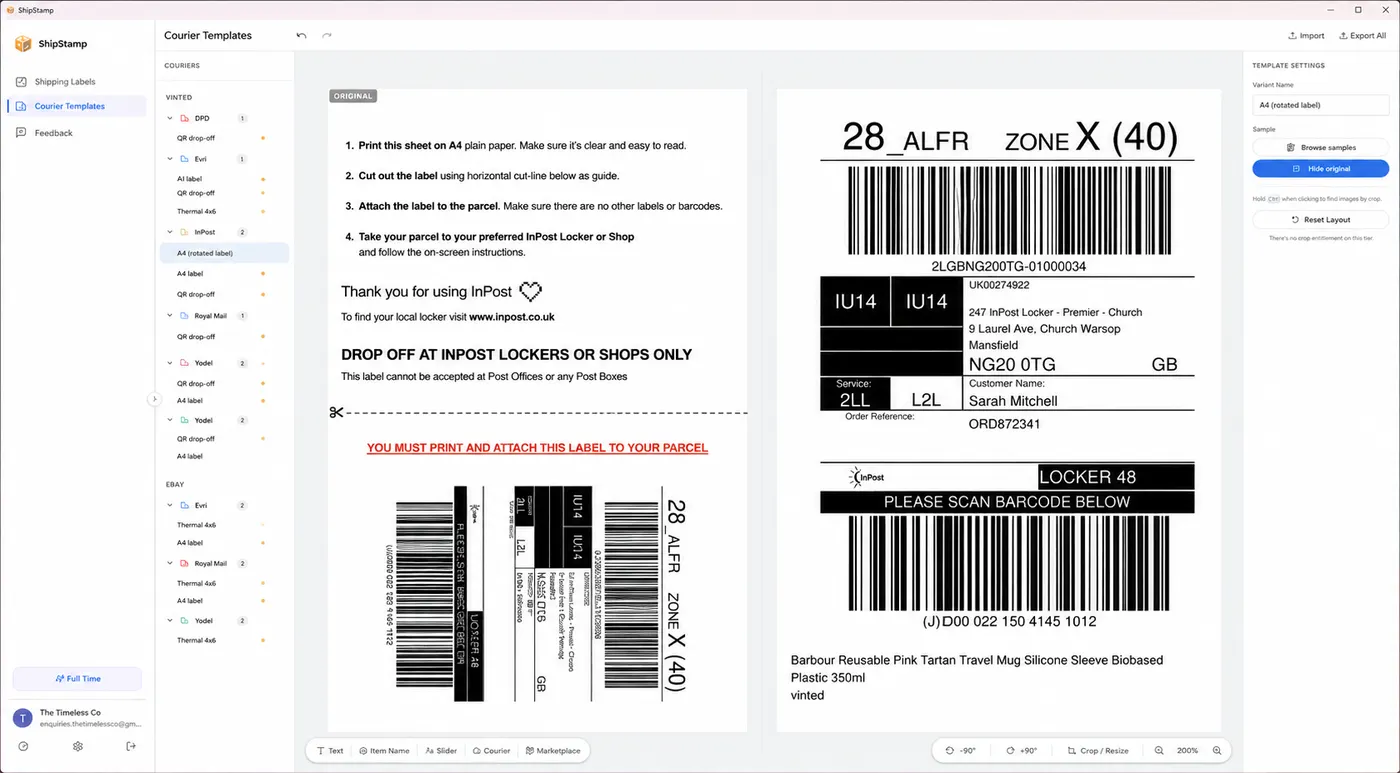
Vinted knows this. Its sellers have the printers. Its courier partners, InPost and Evri chief amongst them, produce labels formatted for exactly this size. Yet when Vinted emails you a shipping label, it arrives as an A4-formatted PDF. Not a 100×150mm PDF. An A4 PDF. The label artwork sits somewhere in the middle of a 210×297mm page, surrounded by padding, metadata, and whitespace that made sense when the intended destination was an office laser printer.
For a seller with an inkjet printer and a stack of A4 paper, that’s fine. Print, fold, tape. Cumbersome, but it works.
For a seller with a thermal label printer and a roll of 100×150mm stock, it is a small daily catastrophe.
The ritual every Vinted seller with a label printer knows
Here is the actual sequence a UK Vinted seller must follow to print one label correctly on a thermal printer. Not a hypothetical. This is what sellers are doing, right now, for every sale.
First, find the email. Vinted sends the label to your inbox. Sometimes it arrives within minutes. Sometimes it’s late. On a busy selling day you might have four of them across two accounts, and you’re hunting through a cluttered inbox for the right one.
Second, download the PDF. Click the link or attachment. Wait for it to open. If you’re using a browser PDF viewer, you may discover the browser’s built-in print dialog gives you no useful control over paper size scaling. Close it. Open the file in Adobe Acrobat, Foxit, the Windows Photos app, or whatever PDF tool you have installed.
Third, navigate the print dialog. Set the paper size to 100×150mm, if your application even lists it. Many don’t. In Windows, you may need to open your printer’s device settings, create a custom paper size, name it, save it, then return to the print dialog and hunt for it in a dropdown. This step alone has generated hundreds of Reddit threads and at least one YouTube tutorial with 47,000 views.
Fourth, choose your scaling. ‘Fit to page’ will likely shrink the label artwork, including the barcode, to fit within the stock, scaled down from A4 proportions. A barcode at 60% of its intended size is technically readable. At 40%, it’s a coin toss. You need ‘Actual size’ or a custom scale, then mentally work out whether the artwork will be cropped. If it will, you find out by wasting a label.
Fifth, print. Check the output. If the barcode is unreadable, misaligned, or off the edge of the stock, discard and repeat from step four.
Do that for every sale. If you ship ten items a week, unremarkable for an active Vinted seller, that’s ten separate downloads, ten separate print dialogs, ten separate chances for something to go wrong.
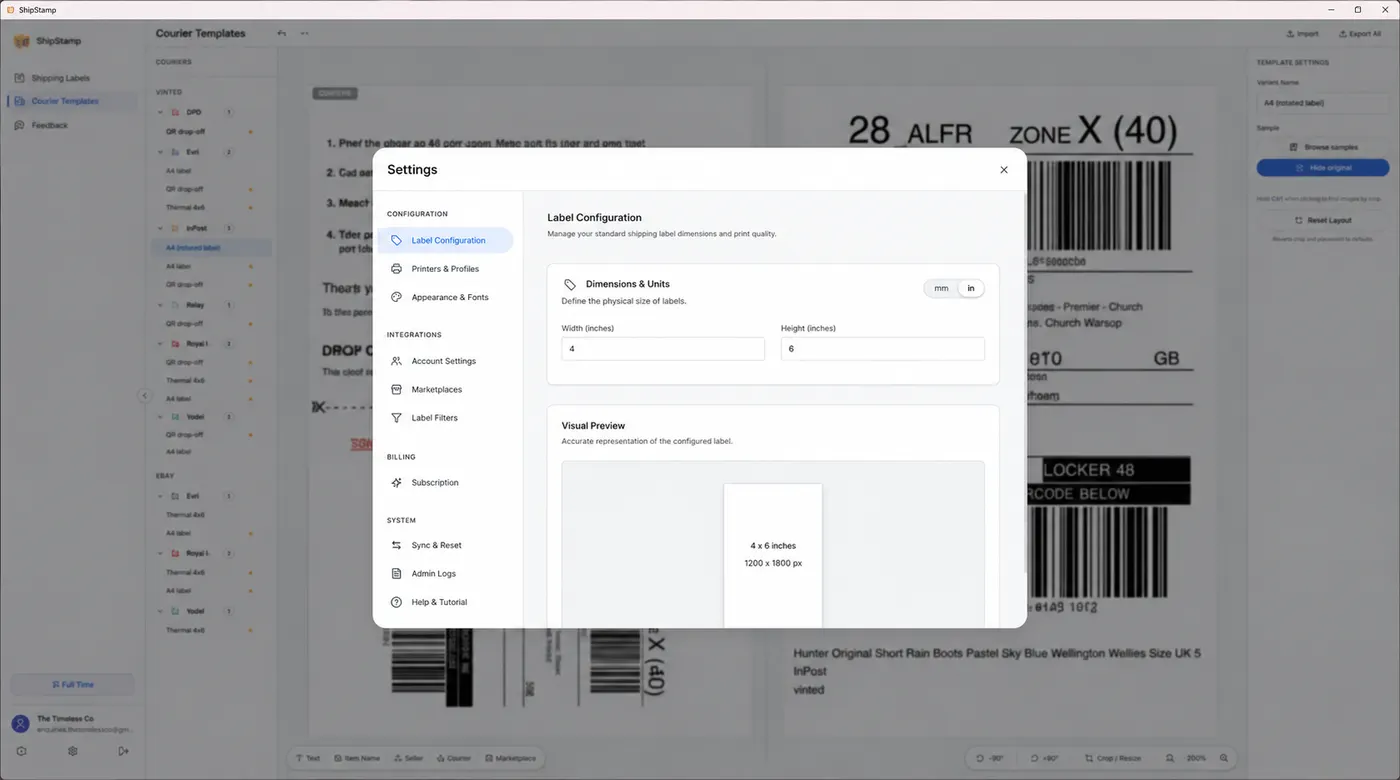
Why hasn’t Vinted fixed this?
Probably because it doesn’t have to. The majority of its users, the casual seller clearing out a wardrobe once a season, will never own a thermal label printer. They print at the library, stick a folded label in a plastic wallet, or use InPost’s QR-code drop-off, which sidesteps printing entirely. For them, the current system is fine.
The sellers who feel this most acutely are the ones Vinted has come to depend on most: the power sellers. Resellers shifting thirty, fifty, a hundred items a month. Vintage clothing pickers, sneaker flippers, people treating Vinted as a part-time income. These sellers have invested in infrastructure, label printers included, because they’re serious about efficiency. Vinted’s label workflow treats them as an afterthought.
Compare this to eBay, which has had a dedicated ‘print label’ flow generating correctly-sized thermal label PDFs for years. Or to Amazon, whose seller portal outputs labels that drop straight onto a 100×150mm printer with no configuration at all. Vinted, despite its explosive UK growth, has never built this.
There’s also a technical wrinkle worth understanding. Different Vinted courier integrations produce different label formats. An InPost Locker label looks different from an Evri label, which looks different from a Royal Mail label. The margins differ. The artwork dimensions differ. The metadata blocks at the top differ. Even if a seller works out the correct print settings for one courier, those settings may produce a misaligned print for the next. There is no single configuration that works universally, so the problem never fully goes away, however much effort you put into solving it.
The label waste nobody talks about
Thermal label stock isn’t expensive in bulk (a roll of 500 labels costs around £8 to £12), but the waste from misprinted labels adds up faster than sellers expect. More to the point, it adds up invisibly. A seller who wastes two or three labels per session, across ten sessions a week, burns through an extra roll every fortnight. That’s £20 to £30 a month in wasted stock that never appears on a profit-and-loss sheet, never prompts a complaint to Vinted, and never generates the feedback that might motivate a platform to fix the problem.
The other cost is time. Postal workers and logistics researchers have a phrase for this: ‘last-mile friction’. Vinted’s label print workflow is exactly that. Not dramatic enough to make anyone quit the platform. Precisely dramatic enough to eat ten minutes of every selling session, compounding, invisibly, into hours per month.
The workarounds that don’t really work
Sellers have been creative. The most common approach is a PDF tool that allows cropping: open the label, crop the A4 page down to the label artwork, save, then print. This works, until a new Vinted courier integration places the artwork in a slightly different position and the crop is wrong again.
Others use scaling hacks: set the paper size to A4, print at a specific percentage that maps the artwork onto 100×150mm stock. This requires knowing the exact percentage for each courier, and re-establishing it whenever Vinted quietly updates its label templates.
Some sellers have given up on thermal printers for Vinted entirely, using them only for eBay and Amazon whilst printing Vinted labels on A4 and cutting or folding them by hand. This is, in every meaningful sense, a defeat. The thermal printer is on their desk precisely to avoid this.
The recurring theme in all these workarounds is the same: the seller is absorbing technical complexity that the platform should handle. Solving a software problem with manual effort, repeatedly, for every sale.
A note on barcodes: the stakes are not trivial
A label with a misscaled or partially-cropped barcode will fail to scan at the courier drop-off point. The parcel may be refused, held, or marked undeliverable. Vinted’s buyer protection kicks in and the seller may not be paid. Then comes the support ticket, the wait, the potential refund or re-send.
This isn’t rare. Forums for Vinted sellers are full of threads titled ‘InPost label won’t scan: what do I do?’ and ‘Evri rejected my parcel, label looks fine to me.’ A meaningful proportion of these trace back, directly or indirectly, to a printing error that a correctly-formatted label would have prevented.
The stakes, in short, are not just wasted labels. They are late payments, bad reviews, and disputes: the compounding consequences of a small technical failure at the very last moment of a transaction.
Common questions
Why does my Vinted label print wrong on my thermal printer?
Vinted generates shipping labels as A4-formatted PDFs, not 100×150mm. The label artwork sits inside a larger page, so it prints at the wrong size or gets clipped when sent directly to a thermal label printer without scaling or cropping first.
How do I print a Vinted label on a 100×150mm thermal printer?
You need to crop or scale the A4 PDF down to just the label area before printing. The easiest method is software like ShipStamp, which automatically detects the label area for each courier and sends it to your thermal printer at the correct size.
Does Vinted support thermal label printers?
Not natively. Vinted sends labels as A4 PDFs designed for office printers. Unlike eBay or Amazon, Vinted has not built a dedicated print flow that generates correctly-sized 100×150mm PDFs for thermal printers.
The fix
ShipStamp does all of this automatically
ShipStamp connects to your Gmail or Outlook inbox, finds every Vinted (and eBay) shipping label the moment it arrives, identifies the courier, crops and sizes the artwork to exactly 100×150mm, and sends it to your thermal printer, correctly, every time, in one click.
No downloading. No print dialog hunting. No custom paper size configuration. No scaling arithmetic. No wasted labels. You make a sale; ShipStamp handles the label. The printer outputs a correctly-sized label with a scannable barcode, ready to stick and post.
If you sell on Vinted and you own a thermal label printer, ShipStamp is the piece of software Vinted should have built and didn’t.
Join the waitlist