 ShipStamp
Do You Need a Thermal Printer to Sell on Vinted?
No. You do not need a thermal printer to sell on Vinted. Millions of UK sellers print their labels on inkjet printers, fold them into plastic wallets, or skip printing altogether with QR-code drop-off. But there is a point in every serious seller’s journey where a thermal printer stops being a luxury and starts being the obvious next step. This article explains where that point is, and what actually changes when you cross it.
What most sellers actually do
The majority of Vinted sellers in the UK never buy a dedicated label printer. They print on whatever printer they have at home, or they use InPost’s QR-code option and let the locker print the label itself. For someone selling five to ten items a month, this is completely sensible. The overhead of buying and setting up a specialist printer for that volume makes no financial sense.
The standard approach works like this. Vinted emails you a shipping label PDF when a sale goes through. You open the email, download the PDF, print it on A4 paper, cut or fold it so only the label is showing, and stick it to the parcel with tape or a plastic wallet. InPost and Evri both accept this. Royal Mail requires the label to be clearly visible and undamaged. As long as the barcode is readable, the courier doesn’t care whether it came from a thermal printer or a six-year-old inkjet.
So if you’re selling occasionally and you have a printer at home, you are already set up. No additional hardware required.
When it starts to matter
The calculus changes as volume goes up. Not dramatically, not all at once, but gradually, in a way that most sellers don’t notice until they sit down and think about where their packing time actually goes.
Printing on A4 and cutting or folding takes roughly two to three minutes per parcel. That includes finding the email, opening the PDF, printing, waiting for the inkjet to warm up (inkjets always need to warm up), cutting the paper to size, and applying the label. At five items a month, that’s fifteen minutes. Negligible.
At twenty items a month, it’s closer to an hour. At fifty, it’s the better part of an afternoon. And it’s not just the time. Inkjet printers use ink. Ink cartridges cost money. A4 paper costs money. The plastic label wallets cost money. None of these costs are large individually, but they add up in a way that never quite appears on a profit-and-loss sheet because nobody bothers to track them.
There is also the quality issue. An inkjet label printed on plain A4 is vulnerable to moisture. Get it slightly wet in transit and the ink smears. A smeared barcode fails to scan. A parcel that fails to scan at the drop-off point either gets refused or sits in a grey zone where neither the buyer nor the seller can confirm it’s been collected. That situation then requires a support ticket, a wait, and potentially a refund. Thermal labels are waterproof by nature. It is one of the fundamental reasons couriers prefer them.
The case for thermal: what actually changes
A thermal label printer does not use ink. It uses heat to darken a chemically-treated label surface. The result is a label that prints in about three seconds, costs roughly 1.5 to 2 pence per label in consumables, requires no warmup time, and produces output that is waterproof, fade-resistant, and readable by every barcode scanner in the courier network.
The speed difference alone is significant. A thermal printer on a roll of 100x150mm labels prints and ejects a label faster than you can reach for the tape dispenser. There is no cutting, no folding, no waiting. Peel and stick. For a seller processing twenty or thirty parcels in a session, this is not a marginal improvement. It is a different experience entirely.
There is also the psychological dimension, which sounds trivial but isn’t. When packing parcels is fast and clean and requires no improvisation, sellers tend to do it more regularly. The friction of the A4 process, multiplied across many sessions, quietly discourages volume. A thermal printer removes that friction entirely.
The case against: when a thermal printer is overkill
A decent thermal label printer costs between £40 and £150. A Rollo or Polono at the lower end of the market is perfectly adequate for home selling. But £40 is still £40, and if you’re selling five items a month, it will take over a year of use before the time and consumable savings justify the upfront cost.
There is also a setup consideration. Thermal printers require a Windows driver, a custom paper size configured in your print settings, and some patience the first time you use one. It is not complicated, but it is not zero effort either. For a seller who only packs once a week on a Sunday afternoon, the existing inkjet-and-tape approach may simply be good enough.
The honest answer is that thermal is worth it once you’re consistently shipping more than fifteen to twenty items a month. Below that, the maths doesn’t clearly favour it.
What about printing at a library or Post Office?
Some sellers, particularly those without a home printer of any kind, use public printing. InPost’s QR-code drop-off is specifically designed for this scenario: you show the QR code at the locker, it prints the label itself, and you never need a printer at all. For InPost shipments, this is a genuinely good option.
For Evri and Royal Mail, QR-code options exist but are more limited. Some sellers use a combination approach: QR code for InPost, printed label for everything else. This works, but it adds a layer of decision-making to every sale that gets tedious at volume.
Printing at a library or office costs roughly 10 to 20 pence per page plus travel time. For occasional use it’s fine. As a long-term strategy for regular sellers, it is almost certainly more expensive than buying an entry-level thermal printer and using it at home.
The inkjet middle ground
There is a third option that gets less attention: printing on a regular inkjet but using proper self-adhesive label sheets rather than plain A4. These are available in A4 sheets formatted for 100x150mm labels (two per sheet), and they eliminate the cutting and folding step. You still need tape, but the label itself is already adhesive. Print quality is better than a folded A4 sheet, and the labels are slightly more water-resistant than plain paper.
This is a reasonable middle ground for sellers at ten to twenty items a month who aren’t ready to invest in a thermal printer but want to improve on the basic A4 approach. It costs a little more per label than plain paper, but significantly less than a thermal printer upfront.
The part nobody mentions: the label workflow matters more than the printer
Here is something that rarely comes up in discussions about Vinted printing setups: the printer is only one part of the problem. The other part, often the bigger part, is the process of getting the label from Vinted’s email to your printer in the first place.
Regardless of what printer you own, the default Vinted workflow looks like this. Find the email. Download the PDF. Open it in a PDF viewer. Configure the print settings for your paper size. Print. Check the output. Repeat for every sale.
That process is the same whether you have a £200 Zebra thermal printer or a £30 inkjet. The printer hardware is the final step. Everything before it is manual, repetitive, and easy to get wrong.
This is worth understanding because sellers often assume that buying a thermal printer will solve their label workflow. It speeds up the printing step. It does not automate the finding, downloading, and organising steps that precede it.
Common questions
Do you need a thermal printer to sell on Vinted?
No. Vinted works fine with any home printer — inkjet or laser. You print the label on A4 paper, cut or fold it, and attach it to the parcel. A thermal printer becomes worthwhile once you are shipping more than 15–20 items per month.
What printer do I need for Vinted labels?
Any printer works. A thermal label printer such as a Rollo, DYMO 4XL, or Brother is faster and produces waterproof labels, but a standard inkjet prints Vinted labels just as well for lower volumes.
Is a thermal label printer worth buying for Vinted?
If you ship more than 15–20 items per month, yes. A decent thermal printer costs £40–£150 and pays for itself quickly through time savings and lower consumable costs compared to printing on inkjet with paper and tape.
The fix
ShipStamp works with any printer you already own
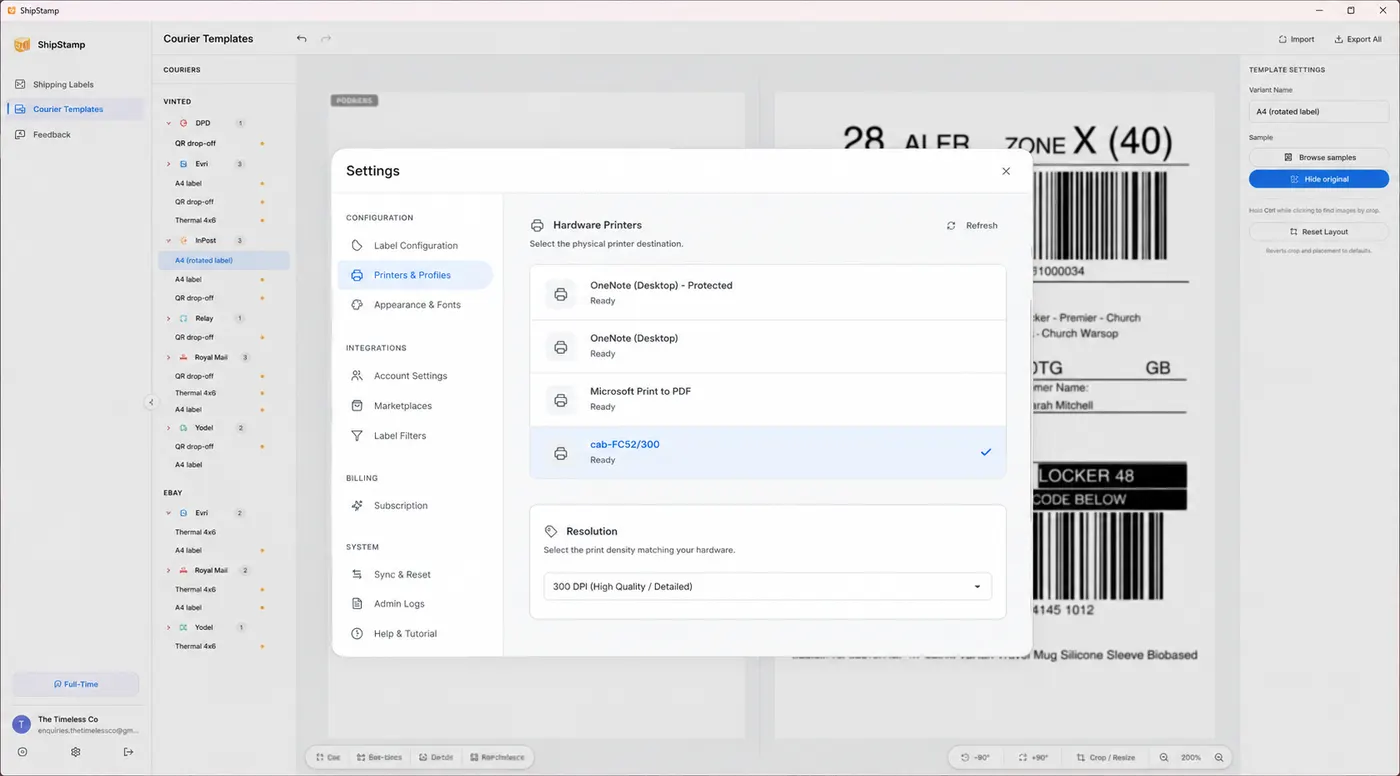
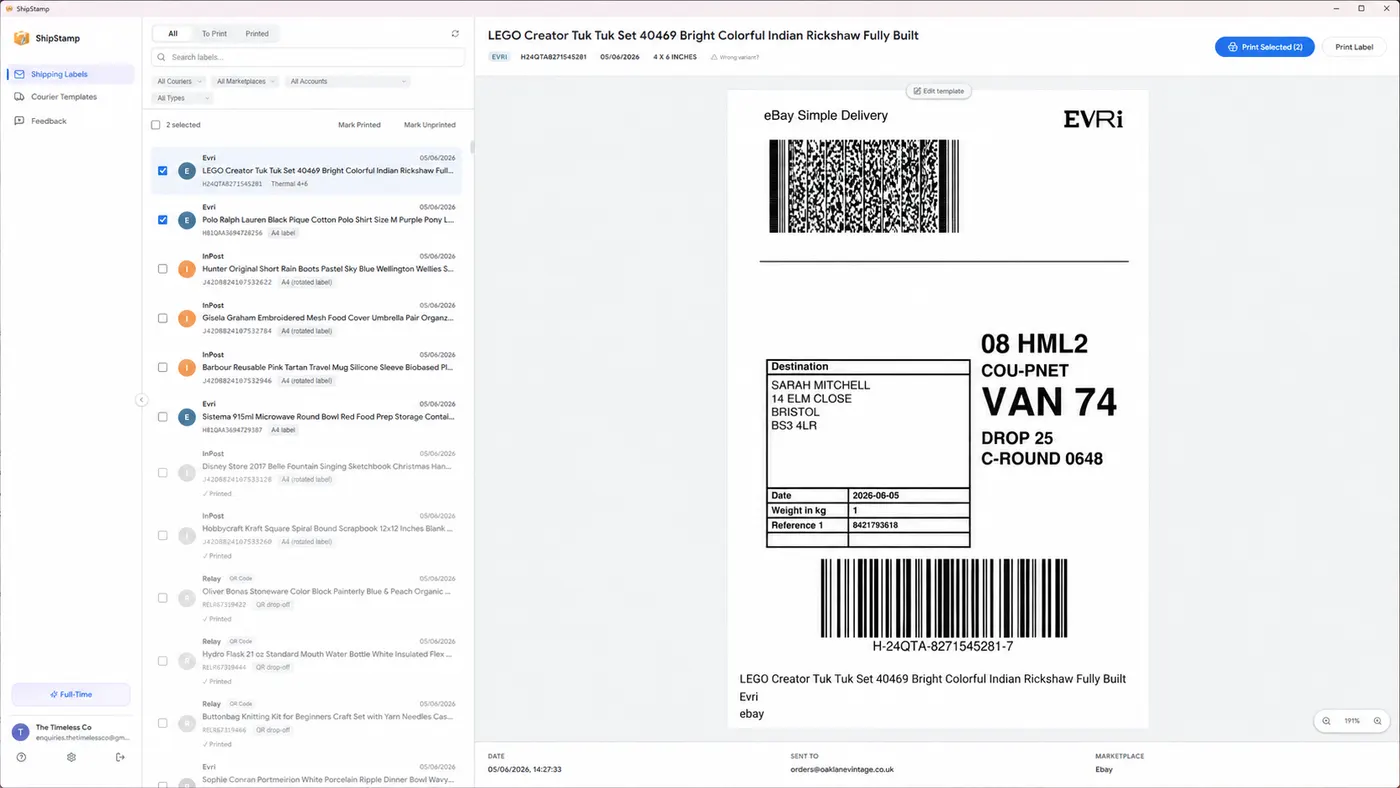
ShipStamp connects to your Gmail or Outlook inbox, finds every Vinted (and eBay) shipping label automatically, and sends it to whichever printer you choose: a thermal label printer, a standard inkjet, a laser printer, or even Microsoft Print to PDF if you want to save labels for printing elsewhere. Any printer Windows can see will work.
So whether you’ve just started selling, you’re on the fence about buying a thermal printer, or you already have one gathering dust because the print setup is too fiddly, ShipStamp handles the label workflow end to end. Find, organise, print. In one click, from one place, on whatever printer is on your desk.
Free to try. 50 labels included, no card required.
Join the waitlist